


CBId before you can get started.
The problem
Building a portfolio import used to require knowing CB identifiers upfront. If your source data used raw company names — from an internal system, a spreadsheet, a counterparty list — you had to resolve those names toCBId before the data was usable. That cleanup step slowed onboarding and made it harder to work with data as it actually came in.What changed
My Portfolios now accepts entity names directly. You can:- Paste a list of names — type or paste directly into the upload flow
- Upload a CSV or XLSX — bring files from external systems without reformatting first
CBId in the background. Where naming conventions vary across systems or sources, the matching workflow reduces the manual cleanup significantly.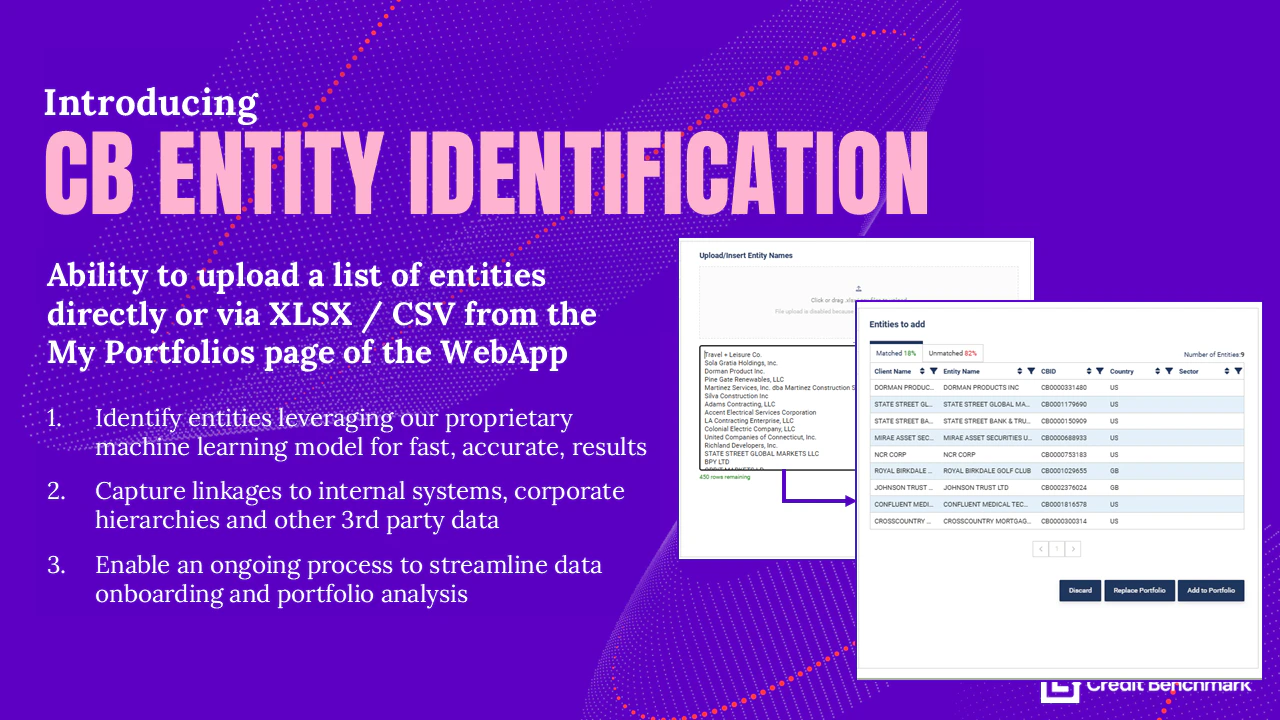
Upload raw names in My Portfolios and let Credit Benchmark handle the matching workflow.
Use cases
- Raw portfolio data — start from a client-supplied name list without a pre-processing step
- Mixed source data — combine names from multiple internal systems without normalizing them first
- Faster onboarding — get a portfolio into CB on the day you receive the data
Getting started
Open My Portfolios, start a new upload, and select Upload by name. For a full walkthrough see Upload Entity List by Name.← All release notes