> ## Documentation Index
> Fetch the complete documentation index at: https://docs.creditbenchmark.com/llms.txt
> Use this file to discover all available pages before exploring further.

# Introducing Entity Name Matching in My Portfolios

<div className="post-byline">
  <img className="post-avatar" src="https://mintcdn.com/creditbenchmark/MBcrXm7PNn_QJihI/images/blog/03_CB_Symbol_Down_SG_pos_RGB.png?fit=max&auto=format&n=MBcrXm7PNn_QJihI&q=85&s=3390b8615aa74c3c052766dc5ca17bce" alt="Credit Benchmark" width="1370" height="1470" data-path="images/blog/03_CB_Symbol_Down_SG_pos_RGB.png" />

  <div className="post-byline-meta">
    <span className="post-author">Credit Benchmark</span>
    <span className="post-date">September 1, 2025 · 2 min read</span>
  </div>
</div>

You can now upload entity lists by name in My Portfolios. Credit Benchmark handles the matching — no need to pre-map everything to `CBId` before you can get started.

<Tip>
  **Paste a list or upload a CSV/XLSX.** CB matches the submitted names to reference entities and maps them to `CBId` automatically.
</Tip>

<div className="blog-body">
  ## The problem

  Building a portfolio import used to require knowing CB identifiers upfront. If your source data used raw company names — from an internal system, a spreadsheet, a counterparty list — you had to resolve those names to `CBId` before the data was usable. That cleanup step slowed onboarding and made it harder to work with data as it actually came in.

  ## What changed

  My Portfolios now accepts entity names directly. You can:

  * **Paste a list of names** — type or paste directly into the upload flow
  * **Upload a CSV or XLSX** — bring files from external systems without reformatting first

  CB matches the submitted names to reference entities and maps them to `CBId` in the background. Where naming conventions vary across systems or sources, the matching workflow reduces the manual cleanup significantly.
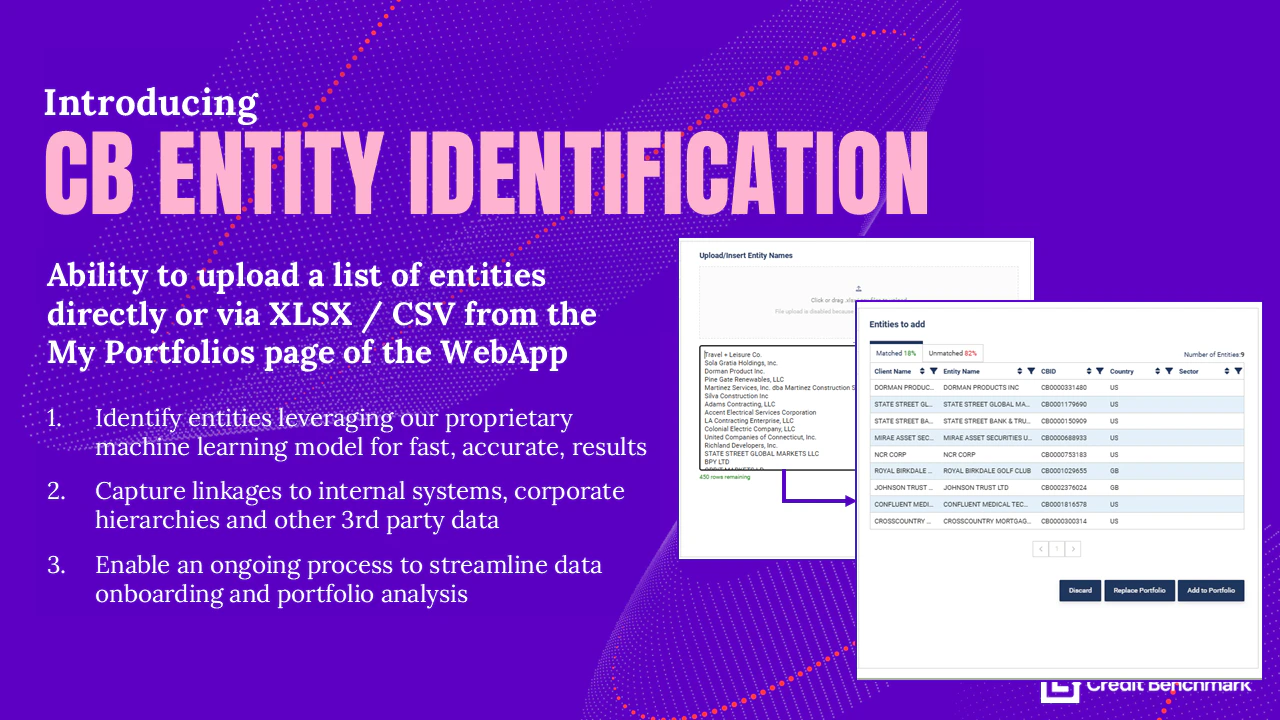
  <Frame caption="Upload raw names in My Portfolios and let Credit Benchmark handle the matching workflow.">
    <img src="https://mintcdn.com/creditbenchmark/MBcrXm7PNn_QJihI/images/blog/new_feature_matching.png?fit=max&auto=format&n=MBcrXm7PNn_QJihI&q=85&s=d3eebcd0d9be31dc33aef86605427279" alt="Entity name matching workflow in My Portfolios." width="1280" height="720" data-path="images/blog/new_feature_matching.png" />
  </Frame>

  ## Use cases

  * **Raw portfolio data** — start from a client-supplied name list without a pre-processing step
  * **Mixed source data** — combine names from multiple internal systems without normalizing them first
  * **Faster onboarding** — get a portfolio into CB on the day you receive the data

  ## Getting started

  Open My Portfolios, start a new upload, and select **Upload by name**. For a full walkthrough see [Upload Entity List by Name](/delivery-channels/webapp-pages/my-portfolios#upload-entity-list-by-name).

</div>

***

[← All release notes](/product-updates)
